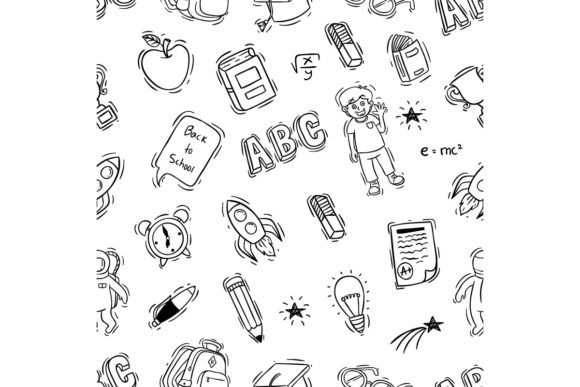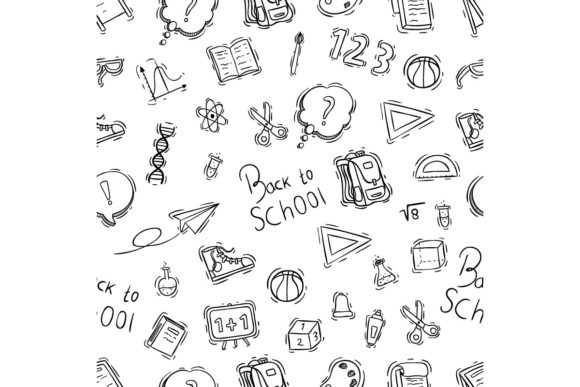
Doodle Back to School Vector Icons for Creators
Whether you are designing a classroom poster, a social media campaign, a printable planner, or a website banner, the right set of visuals can make all the difference. Doodle Back to School Elements or Icons offers a playful yet practical collection of hand-drawn style vector assets that capture the energy and spirit of going back to school. This pack includes 100 vector graphics in RGB color mode, supplied as .AI (Adobe Illustrator), .EPS (version 10 compatible), and .JPG files. Because the files are vector based, you can scale, recolor, and modify them without losing quality, making them a flexible resource for projects of any size.
The doodle aesthetic is intentionally informal and approachable. Instead of stiff or overly polished clip art, these icons feel drawn by hand, which adds warmth and personality to anything you create. For anyone working in education, marketing, content creation, or small business, this style can help your materials stand out while still communicating a clear, friendly message.
What Makes This Pack Different from Standard Icon Sets
Many icon libraries focus on flat, uniform designs that work well for interfaces but lack character for print or brand materials. Doodle Back to School Elements or Icons takes the opposite approach. Each element carries an organic, sketch-like quality that feels personal and inviting. The set covers a broad range of school-related subjects: pencils, books, apples, backpacks, globes, graduation caps, chalkboards, clocks, bus icons, science beakers, musical notes, sports equipment, and more. Because it is a pure vector pack, you are not limited to preset colors or sizes. You can open the .AI or .EPS file in your preferred vector software and edit every anchor point, fill, and stroke.
Another practical advantage is the inclusion of a .JPG version. While vectors are ideal for editing and scaling, sometimes you need a quick preview or a raster image for a specific use. Having all three formats in one download saves time and removes compatibility worries. The color space is RGB, which means the icons are optimized for digital screens, presentations, and online use. If you need CMYK for print, you can convert the vectors easily within your software.
Who Benefits Most from a Doodle Vector Set
A single resource can serve many different people, but each person may value different features. Here is a look at how various audiences might approach this pack and what they should consider before purchasing.
Educators and School Staff
If you teach, run a classroom, or work in a school setting, you likely need to create visual materials regularly. Newsletters, bulletin board decorations, worksheets, lesson slides, and event flyers all benefit from engaging graphics. The doodle style works especially well for children because it feels relatable and less corporate. You can use the icons to build a consistent visual theme across your classroom materials without hiring a designer. Because the files are vector, you can enlarge a pencil icon to fill a poster or shrink a bus icon to fit a sticker sheet, all without pixelation. Teachers on a tight budget will also appreciate that one pack can cover many projects throughout the year.
A practical example: a third-grade teacher might open the .AI file, select a set of icons, and arrange them into a weekly schedule chart. By changing the colors to match a classroom theme, the chart becomes both functional and visually cohesive. The same teacher could later use different icons from the same pack for a back-to-school night invitation.
Content Creators and Bloggers
Bloggers, social media managers, and YouTubers who produce educational or family-oriented content need visuals that are both recognizable and distinctive. Stock photos can feel generic, and creating custom illustrations from scratch takes time. A doodle icon pack gives you a library of ready-made elements that you can drop into thumbnails, Instagram posts, Pinterest pins, or website headers. The hand-drawn look helps your content feel more authentic and less manufactured, which resonates with audiences seeking genuine advice or teaching.
For example, a blogger writing a series of posts about study tips could use the globe, book, and clock icons as section dividers. By recoloring them in a consistent palette, the entire article set gains a cohesive visual identity. Since the pack includes 100 icons, you can avoid repeating the same graphic too often across your site or channel.
Small Business Owners and Entrepreneurs
If you run a tutoring center, a private school, an educational product store, or a children's service business, your branding and marketing materials need to project a specific tone. The doodle style conveys approachability, creativity, and a focus on learning. You can use these vectors to create flyers, business cards, promotional banners, email headers, and product labels. The commercial applicability is strong because the files are designed for editing. You can adjust colors to match your brand guidelines, combine icons with your logo, or use elements as part of a larger layout.
Consider a small business owner who sells printable educational games on Etsy. Using the same doodle icons across product covers, preview images, and listing descriptions creates a unified shop aesthetic that builds customer trust. With the .EPS file provided in an older version format, even users running CorelDraw or Affinity Designer can open the artwork without compatibility issues.
Hobbyists and DIY Enthusiasts
Not everyone who buys a vector pack is a professional designer. Many people enjoy creating personal projects for family, friends, or community groups. If you are planning a back-to-school party, making a custom calendar, designing a scrapbook page, or putting together a gift for a teacher, these doodle icons give you a head start. The learning curve is low. You do not need advanced design skills to import the .AI or .EPS file, drag an icon onto your canvas, and resize it. The JPG version also allows you to work in simpler tools if you are not comfortable with vector software.
A hobbyist might use the icons to create a set of personalized bookmarks for a child's class. By printing the designs on cardstock, cutting them out, and adding a ribbon, the result looks professional without requiring hours of drawing from scratch. The variety in the pack means you can tailor the selection to match the recipient's interests.
Factors to Consider Before Choosing This Pack
Different users prioritize different aspects of a design resource. Here is how to evaluate whether this pack aligns with your specific needs.
Ease of Use Across Software
The pack is supplied in .AI (native Adobe Illustrator format), .EPS (version 10), and .JPG. For Illustrator users, editing is straightforward. For CorelDraw, Affinity Designer, Inkscape, or other vector programs, the .EPS file is your best entry point. EPS version 10 is supported by a wide range of software, which reduces the risk of file corruption or missing elements. Beginners should note that opening a vector file for the first time may feel unfamiliar, but the doodle style is forgiving: even a simple resize or color change improves the result. If you are brand new to vector graphics, start by opening the JPG to see the icons, then move to the EPS file and experiment with scaling.
Quality and Scalability
Because these are vector graphics, you can scale any icon to billboard size or icon size without losing sharpness. The doodle style includes intentional line variations and slight imperfections, which are part of the charm. If you prefer hyper-clean, symmetrical icons, this aesthetic may feel too loose. But for back-to-school themes, the hand-drawn look usually enhances the message rather than detracting from it. The RGB color mode ensures bright, consistent colors on screens, which matters for digital presentations, websites, and social media.
Flexibility and Customization
With 100 individual elements, you have enough variety to cover multiple projects without repeating the same icon too often. You can group, ungroup, recolor, rotate, and combine elements freely. For advanced users, the vectors can be used as building blocks for more complex illustrations. For example, you might take the chalkboard icon, add text inside it, and combine it with the apple and book icons to create a custom Instagram graphic. The flexibility is high because the files are not flattened or locked.
Long-Term Usefulness
A back-to-school theme is seasonal, but many of the icons in this pack are versatile enough to use year-round. Books, pencils, globes, and science symbols work for general educational content regardless of the time of year. Business owners and educators can rely on this pack as a core resource rather than a one-time purchase. The fact that it includes older format EPS files also means you can archive the pack and open it years later with updated software, which adds to its long-term value.
Practical Examples for Different Project Types
To help you visualize how the pack fits into real workflows, here are a few concrete scenarios.
- Classroom newsletter: Use the bus, apple, and book icons as section headers. Import the EPS into Microsoft Publisher or Canva (via JPG) if vector editing is not available. Change the color of the bus to match your school colors.
- Social media campaign: Select five doodle icons, arrange them in a grid, and add text overlays for a back-to-school countdown series. Export as PNG from Illustrator for crisp social posts.
- Product packaging: Integrate the globe or graduation cap icon into a product label for an educational board game. Since the vector is scalable, you can adjust it to fit small stickers or large boxes.
- Printable wall art: Combine several icons into a collage, print at 18x24 inches, and frame it for a classroom or kid's room. The vector resolution ensures clean edges at any print size.
- Presentation slides: Use the icons as visual anchors in a PowerPoint or Keynote deck. Recolor them to match your brand palette. The JPG version can be inserted directly without software conversion.
Is This Pack Right for You?
Doodle Back to School Elements or Icons is a strong choice if you value a warm, hand-drawn look and need a versatile set of school-themed vector graphics. It works well for educators, content creators, small business owners, hobbyists, and anyone who wants to add personality to their projects without starting from scratch. The inclusion of three file formats means you can use it with Adobe Illustrator, CorelDraw, or simpler tools, and the RGB color mode suits digital and screen-based work.
If you require highly realistic illustrations or a strictly minimalist corporate style, this doodle aesthetic may not match your vision. But for projects that aim to feel friendly, creative, and accessible, it provides a solid foundation. Before purchasing, consider your typical output format: if you work primarily in print, remember that RGB colors may shift slightly in CMYK conversion, so test a few icons in your print workflow. If you work exclusively in raster software (like Photoshop without vector support), the JPG versions will still be useful, though you lose the scaling advantages of vectors.
Ultimately, the value of a vector pack comes from how well it fits your process and your audience. By thinking through your specific use case, you can decide whether this collection of doodle back to school icons deserves a place in your digital toolbox.