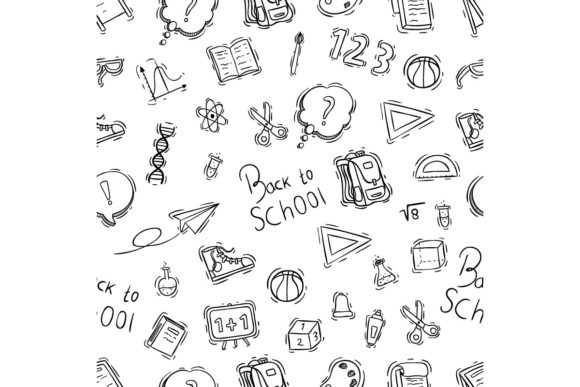
Doodle Back to School Supplies Elements for Vector Design
Whether you are a graphic designer preparing seasonal content or a teacher creating classroom materials, the right set of vector assets can save time and add personality to your work. Doodle Back to School Supplies Elements offers exactly that—a collection of hand-drawn style illustrations centered around school themes, delivered in formats that work across major vector software. This article walks through what this pack contains, who might benefit from it, and how to decide if it fits your next project.
What Is Included in This Vector Pack
The pack centers on doodle-style school supply imagery. Think pencils, books, backpacks, rulers, apples, and similar motifs drawn with a playful, hand-rendered aesthetic. The set provides 100 individual vector elements, each ready to use or customize. You receive files in three formats: .Ai (Adobe Illustrator native), .EPS (version 10 for broader compatibility), and a .JPG preview for quick reference. Colors are set to RGB, which suits digital screens, presentations, and web use.
Because the files are vectors, you can scale any element without losing quality. This matters whether you are printing a poster or placing a small icon on a website. The doodle style also means the illustrations feel casual and approachable—ideal for projects aimed at students, parents, or educational environments.
Why Different Audiences Might Care About This Product
Depending on your role and goals, the same set of doodle elements can serve very different purposes. Below are several perspectives to help you see where this pack might fit your workflow.
Beginners Exploring Vector Software
If you are new to Adobe Illustrator, CorelDraw, or similar programs, working with pre-made vector files can be a gentle way to learn. You can open an element, inspect how it was built, and experiment with colors or sizes without starting from scratch. The doodle style is forgiving—imperfect lines and casual shapes mean you have room to make changes without worrying about breaking a polished look. This pack gives you practical material to practice grouping, ungrouping, recoloring, and layering. Many beginners appreciate that the .EPS version works in older software versions, so you do not need the latest subscription to open and use the files.
Experienced Designers and Creative Professionals
For seasoned designers, time is often the scarcest resource. Having 100 ready-made doodle elements means you can drop them into a layout, adjust the stroke weight or hue, and move on to composition or client revisions. The vector format lets you combine these elements with other graphics, apply your own color palette, or repurpose them across multiple projects. If you handle seasonal campaigns, back-to-school content, or educational branding, this pack can serve as a consistent visual library. You might also appreciate the ability to mix these doodles with more polished assets to create contrast and visual interest.
Educators and Content Creators
Teachers, tutors, and educational content creators often need visuals that feel friendly and relatable. Doodle-style illustrations can make worksheets, slide decks, or classroom posters less intimidating. You can use individual elements to label diagrams, decorate handouts, or build reward charts. Because the files are in RGB and vector formats, you can adapt them for digital whiteboards, printed materials, or learning management system banners. For educators who are not design specialists, the ease of opening a .Ai or .EPS file and resizing without quality loss is a practical advantage—no need to learn complex software features to get usable results.
Small Business Owners and Marketers
If you run a small business—whether a tutoring service, a stationery shop, or a family-friendly brand—consistent visual content helps build recognition. You might use these elements on social media posts, email newsletters, or packaging inserts during the back-to-school season. The doodle aesthetic can convey warmth and approachability, which resonates with parents and young audiences. Because the pack includes 100 distinct images, you can create a series of posts or flyers without repeating the same graphic. The cost of a single vector pack is typically far lower than commissioning custom illustrations, making it a practical choice for tight budgets.
Hobbyists and Personal Project Enthusiasts
Maybe you are planning a scrapbook, a blog redesign, or a handmade card for a teacher. Doodle elements add a whimsical touch to personal projects. You do not need professional design training to use these files—just basic familiarity with opening a vector file and dragging elements onto your canvas. Many hobbyists enjoy the creative freedom of mixing and matching different school-themed doodles to tell a story or express a seasonal mood. Since the pack is digital, you can use it repeatedly for future projects, making it a long-lasting addition to your personal design toolkit.
Practical Examples Across Use Cases
To help you visualize how this pack might function in real work, here are a few concrete scenarios:
- Blogger creating a back-to-school guide: You could use doodle pencils and books as section dividers, place a backpack icon next to a packing list, and add school bus illustrations to the header. The consistent style ties the post together visually.
- Freelance designer working for a school supply retailer: You might pull elements to create sale banners, email headers, and social media squares. Because the pack is vector, you can resize for a giant store banner or a tiny icon badge without separate design work.
- Parent volunteering on a school committee: You can open the .EPS file in free or older vector software, pick a few elements, and build a simple flyer for a bake sale or open house. The doodle style feels appropriate for a school context without looking overly corporate.
- Online course creator in education: Use the elements to illustrate course modules, create downloadable planning sheets, or decorate slide transitions. Students often respond well to visuals that feel hand-drawn and engaging.
Priorities to Consider When Evaluating This Pack
Not every vector pack fits every project. Here are the factors different users might weigh before purchasing.
Ease of Use vs. Creative Flexibility
Beginners and casual users often prioritize ease of use. The .EPS format is widely compatible, and the doodle style is forgiving. If you are still learning how to manipulate vector paths, these elements are simple enough to edit without frustration. More advanced users might care about creative flexibility—the ability to ungroup objects, change stroke colors, or combine elements into new compositions. This pack supports all of that because each doodle is built with standard vector shapes and paths.
Cost and Long-Term Value
Compared to commissioning custom illustrations, a vector pack is a low-cost investment. For 100 elements, the per-asset price is minimal. If you expect to create multiple projects over several years, the pack offers strong long-term value. Hobbyists and small business owners might find this especially appealing since a single purchase covers unlimited uses for personal or commercial projects (always check the specific license terms of the pack you buy).
Quality and Style Consistency
Doodle style can vary from messy to charming. In this pack, the illustrations appear intentionally playful but still readable. If your project requires a polished, corporate look, doodle elements may feel too casual. Conversely, if you want to convey creativity, learning, or childhood themes, this style fits naturally. Look at the preview JPG to see whether the line weight, level of detail, and color palette match your aesthetic needs.
Format Compatibility and Reliability
Because the pack includes .Ai, .EPS, and .JPG files, you can open the vectors in Adobe Illustrator, CorelDraw, Affinity Designer, Inkscape, and many other programs. The .EPS version 10 is especially useful if you use older software or want to preserve editing capability across different systems. RGB color space is standard for screens, so if you are designing primarily for digital use, you are good. If you plan to print, you may want to convert to CMYK yourself or test the colors on your output device.
How to Decide If This Pack Matches Your Goals
Ask yourself a few questions before adding any design resource to your library:
- Does your project involve school, education, or back-to-school themes? If yes, the subject matter aligns well.
- Do you prefer a hand-drawn, casual visual style? If your brand or audience responds well to approachable imagery, doodle elements can strengthen that connection.
- Do you have access to vector software that can open .Ai or .EPS files? Most users do, but it is worth confirming before purchase.
- How many unique visuals do you need? With 100 elements, you can cover a wide range of uses without repetition.
- Are you comfortable making minor edits like recoloring or scaling? If you only want to place the images as-is, the pack still works. If you prefer deep customization, the vector format gives you that option.
For many people, the deciding factor is whether the doodle style matches the tone of their brand or project. If you are creating content that should feel warm, playful, or educational, this aesthetic can be a natural fit. If your work requires photorealism or minimal precision, you might look for a different style.
Ultimately, Doodle Back to School Supplies Elements provides a versatile library for anyone who regularly creates school-themed designs. From beginners learning vector software to professionals streamlining seasonal campaigns, the pack offers practical value through its style, format compatibility, and quantity of assets. By considering your own skill level, project needs, and creative goals, you can determine whether these doodle elements will become a go-to resource or a helpful addition for specific seasonal work.